A publishing studio for Windows

Write the book.
Shape the page.

OYAMA Scribe brings drafting, book design, and print proofing into one focused workspace, so the manuscript and the finished volume never drift apart.

$59.99 One purchase. Yours for life.
Includes every update in the current major version.
Built for Windows 10 and 11
HORAN.oyama
OYAMA Scribe editing a chapter with book navigation and publishing properties
LIVE BOOK PROOF 76 sections Whole-book pagination ready

One manuscript. One production system.

Native WindowsLocal-firstBook-awarePrint-ready

The complete workflow

From the first sentence
to the final signature.

Most writing apps stop at words. OYAMA Scribe understands that a book is also structure, rhythm, typography, and physical pages.

01

Write without losing the book

A responsive long-form editor, section navigation, autosave, recovery, and live manuscript statistics keep the work moving.

02

Design the whole volume

Set trim, margins, gutters, typography, chapter openings, running elements, and numbering from one book-aware workspace.

03

Proof the pages that print

Review fixed pages and complete spreads with recto/verso logic, binding guides, page furniture, and true book pagination.

Built around the manuscript

Stay inside the work.

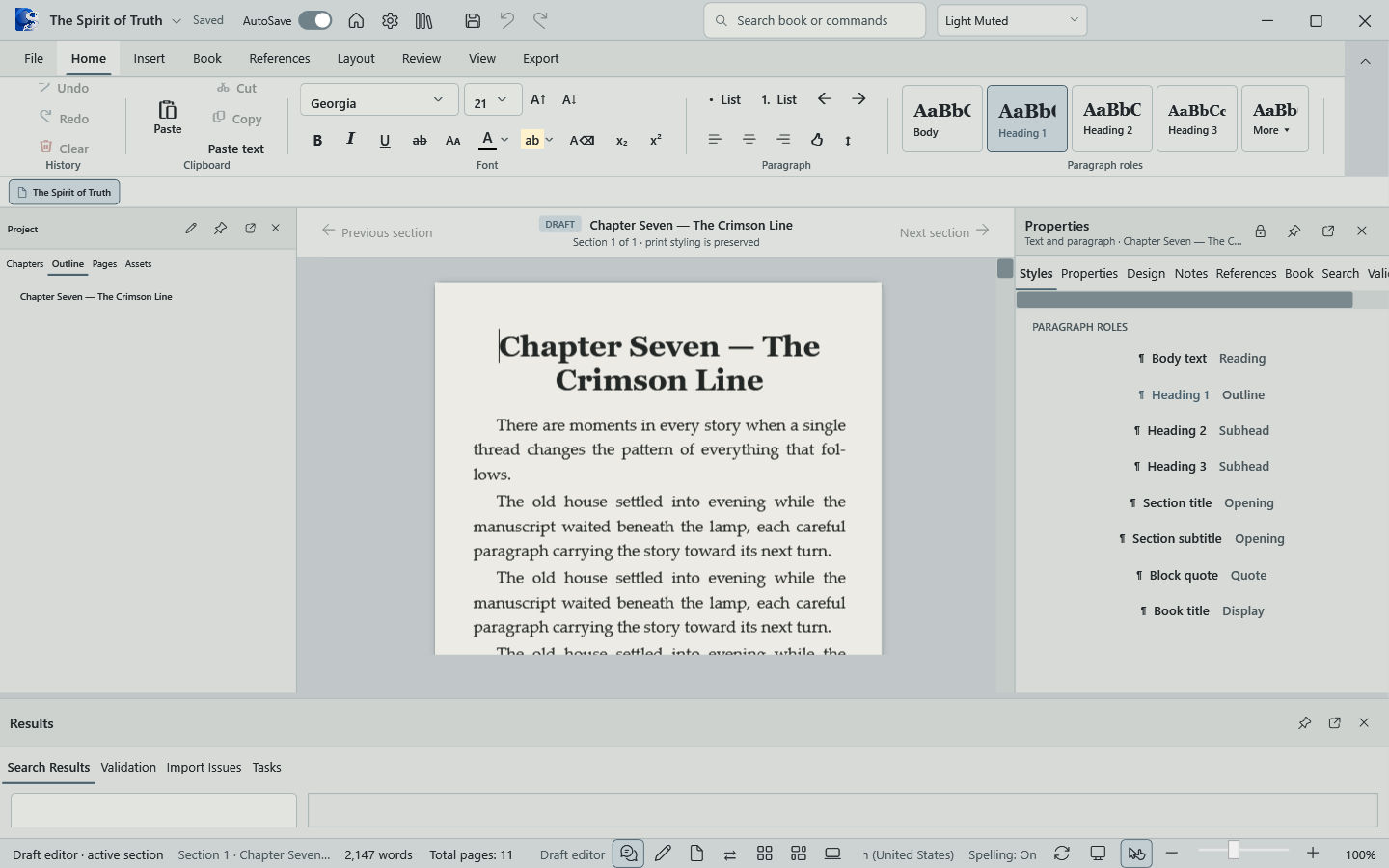
Move through front matter, chapters, notes, and back matter without breaking concentration. Every section remains part of the same living book.

  • Structured book navigator
  • Continuous draft and page views
  • Focused, familiar editing tools
Continuous chapter editing view in OYAMA Scribe

Inside OYAMA Scribe

One workspace for the entire book.

Each part of the application shares the same manuscript, structure, and production settings. There is no export-and-rebuild step between writing and page design.

Book Theme Builder for reading typography and paragraph settings
01 / Typography

Build a reusable visual language.

Choose the body typeface, size, line height, paragraph spacing, first-line indent, alignment, and manuscript heading styles. A print-faithful preview shows how the settings work on the active trim size.

  • Reusable named themes
  • Book-wide or section-level application
  • Live reading-text preview
Opening spread with inside front cover and title page placement
02 / Page architecture

Control where the book begins.

Handle title pages, intentional blanks, right-hand chapter starts, front matter, and opening spreads with real book logic. OYAMA Scribe understands that page one belongs on the recto.

  • Recto and verso placement
  • Intentional blank pages
  • Chapter-start rules
Footnotes and endnotes workspace beside the manuscript
03 / Notes

Keep the apparatus attached to the text.

Create anchored footnotes and endnotes without leaving the manuscript. Search and filter notes, jump back to their anchors, and convert note types while numbering stays under control.

  • Anchored notes
  • Footnote and endnote conversion
  • Persistent notes inspector
Two-page proof with safe area, binding gutter, and outside-edge guides
04 / Preflight

Inspect the geometry before printing.

Turn on safe-area, gutter, inside, and outside-edge guides to verify every page. Review headers, footers, folios, opening-page suppression, and binding behavior in the same proof used for final output.

  • Safe-area and gutter guides
  • Running heads and folios
  • Whole-book pagination
Two-page spread proof with binding and recto verso guides
SPREAD PROOFSee the book
as readers will.

Production without guesswork

Every page has a side. Every margin has a purpose.

Proof complete spreads with real recto and verso placement, mirrored margins, binding gutters, running heads, and page numbers before anything reaches the printer.

6 × 9Book trim presets
2-upTrue spread preview
100%Local manuscript

Thought through to the colophon

The details a real book needs.

Aa

Book-wide typography

Reusable body, chapter, and title styles that stay consistent across every section.

Mirrored page logic

Inside and outside margins, gutter, odd/even pages, and controlled chapter starts.

Publishing structure

Front matter, body sections, notes, table of contents, references, and back matter.

Own your copy

Pay once and keep OYAMA Scribe for life, with every update in your purchased major-version line.

More than a word processor

Production tools included.

OYAMA Scribe keeps the supporting work close to the manuscript, with practical tools for building, checking, and preserving a complete long-form project.

Write & organize

Rich text editing

Book structure navigator

Front and back matter

Scenes and chapter breaks

Find, replace, and spelling

Design & compose

Book theme builder

Trim and margin presets

Page Parts workspace

Headers and footers

Automatic page numbers

Reference & review

Footnotes and endnotes

Citations and references

Table of contents

Page-break manager

Publishing preflight

Protect & deliver

Autosave and recovery

Atomic project backups

Streaming DOCX import

Print and PDF output

Local-first project files

Your workspace, your light

Designed for long sessions.

Switch between crisp light and quiet dark themes while the page itself remains an honest picture of the printed result.

OYAMA Scribe compare and proof workspace

Your book belongs on your desk

Make room for the work
you want to publish.

A focused, local-first writing and book-production studio for Windows.

$59.99One-time purchase
Buy OYAMA Scribe Keep it for life · Includes all current major-version updates · Windows 10/11 · 64-bit

For example: buy version 1.54.3658 and receive every later 1.x release through the version 2.0 boundary.